The SABRENT USB 3.0 Universal Docking Station review comes down to whether its mix of display, network, audio, and USB connections matches your desk setup.
The DS-RICA is aimed at laptop and tablet users who want to connect several peripherals through one dock, with the important caveat that its display support depends on the computer’s operating system and drivers.
SABRENT DS-RICA Review Summary
The quick verdict
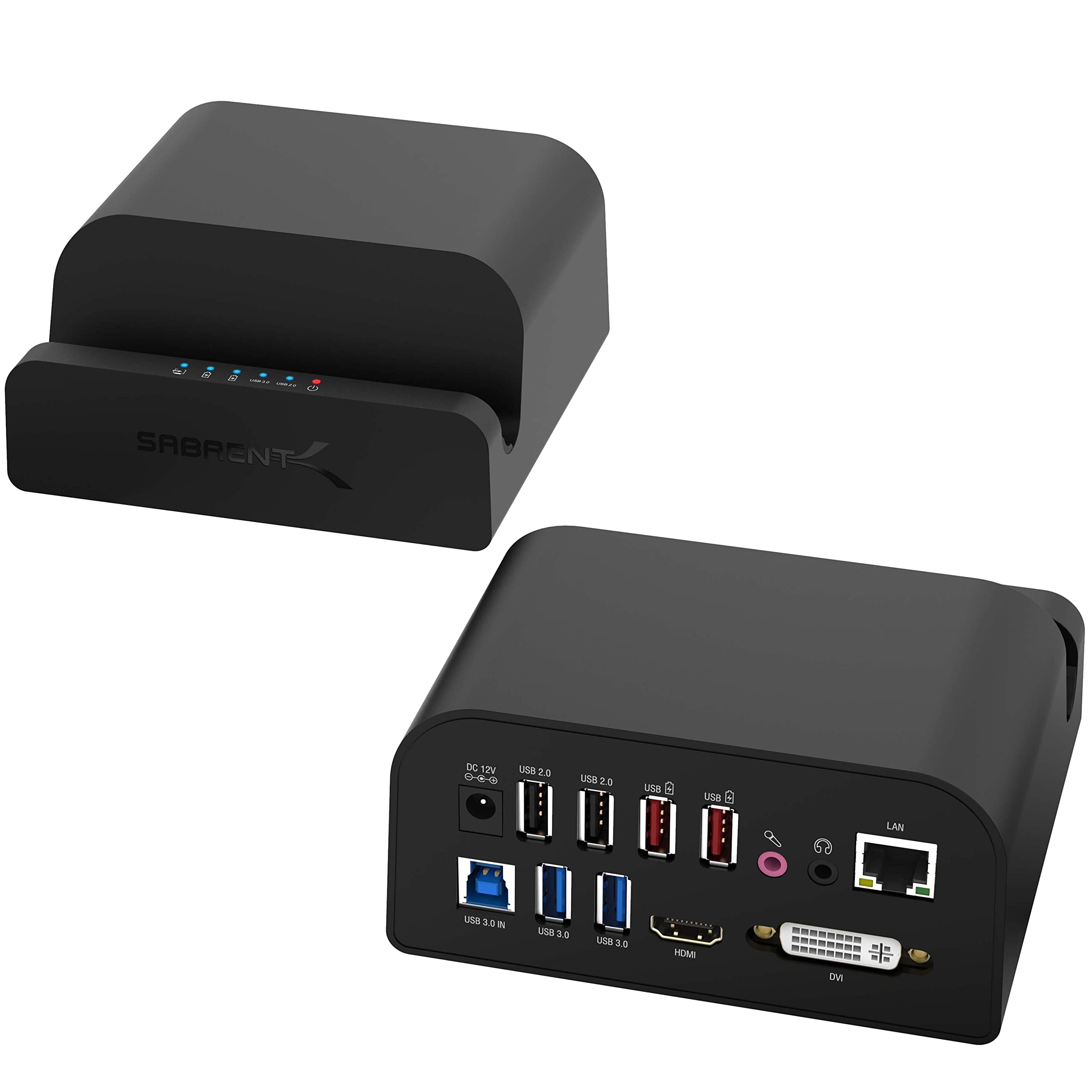
1,000+ ratings
Read Amazon ReviewsSABRENT DS-RICA USB 3.0 Universal Docking Station
A fit for laptop and tablet users who want dual-display connections, wired gigabit Ethernet, and a mix of USB ports in one dock.
- Supports simultaneous HDMI and DVI displays.
- Includes two USB 3.0 ports with transfer speeds up to 5Gbps and two USB 2.0 ports up to 480Mbps.
- Lists USB 1.1 transfer speeds up to 12Mbps.
- Provides a 10/100/1000 gigabit Ethernet port.

Pros
- Combines monitor, wired network, audio, and USB connections in one dock.
- Supports simultaneous HDMI and DVI displays for compatible setups.
Consider before buying
- Mac buyers need to check operating-system and DisplayLink driver compatibility because the supplied information flags a display issue with macOS 10.13.4.
- The USB port mix is limited to two USB 3.0 and two USB 2.0 ports, so count the peripherals you plan to connect.
Read the full review summary
The DS-RICA brings together simultaneous HDMI and DVI displays, gigabit Ethernet, speaker and microphone connections, and four USB ports.
Two USB 3.0 ports support transfer speeds up to 5Gbps, while two USB 2.0 ports support up to 480Mbps; the description also lists USB 1.1 at up to 12Mbps.
Two 2.4A charging ports provide another way to charge devices.
This layout makes the dock worth considering for a fixed workspace that needs a range of older and common connections without relying only on a laptop’s built-in ports.
Check your computer’s compatibility and the current DisplayLink driver situation before buying, especially if you use a Mac: the product information flags a display issue after macOS 10.13.4, while noting that Ethernet and audio are unaffected where implemented.
The buying factors
SABRENT DS-RICA Scorecard
Editorial scores reflect listed features and buyer fit; they are not laboratory measurements or customer ratings.
Display connection options
Simultaneous HDMI and DVI output offers flexibility for compatible monitor setups.
Wired networking
A 10/100/1000 gigabit Ethernet port gives wired-network users a broad speed range.
USB selection
Two USB 3.0 and two USB 2.0 ports cover a useful mix of peripheral connections.
Device charging
Two 2.4A fast-charging ports add dedicated charging connections.
Audio connections
Speaker and microphone jacks accommodate users who want those connections at the dock.
Operating-system confidence
The macOS 10.13.4 DisplayLink warning makes version and driver checks particularly important for Mac buyers.
Key Features and Specifications of SABRENT DS-RICA
- Supports simultaneous HDMI and DVI displays.
- Includes two USB 3.0 ports with transfer speeds up to 5Gbps and two USB 2.0 ports up to 480Mbps.
- Lists USB 1.1 transfer speeds up to 12Mbps.
- Provides a 10/100/1000 gigabit Ethernet port.
- Has speaker and microphone connections.
- Includes two 2.4A charging ports for devices.
Pros and Cons of SABRENT DS-RICA
Pros
- Combines monitor, wired network, audio, and USB connections in one dock.
- Supports simultaneous HDMI and DVI displays for compatible setups.
- Offers a useful mix of USB 3.0 and USB 2.0 ports.
- Provides two dedicated 2.4A charging ports.
Consider before buying
- Mac buyers need to check operating-system and DisplayLink driver compatibility because the supplied information flags a display issue with macOS 10.13.4.
- The USB port mix is limited to two USB 3.0 and two USB 2.0 ports, so count the peripherals you plan to connect.
- The simultaneous HDMI and DVI setup is useful only if it matches the monitors and computer in your workspace; confirm those connections before choosing the dock.
Who Should Buy SABRENT DS-RICA?
Good fit
Consider the DS-RICA if your workspace needs HDMI and DVI display connections alongside wired Ethernet, audio jacks, and a combination of USB 3.0 and USB 2.0 ports.
It brings these connections together in a single docking station, which can help keep a desk setup organized around one accessory.
It may also suit users who want dedicated charging connections in addition to ports for peripherals.
Before ordering, check that your computer and monitors can use the dock’s display arrangement, and confirm the relevant driver support for your operating system.
Who should skip it
Skip this dock if you need a USB-C or Thunderbolt connection, or if the number and types of ports described do not cover your equipment.
Mac users should be especially cautious if their system is affected by the listed DisplayLink display issue; confirm current compatibility for the version they intend to use.
How the SABRENT DS-RICA Fits a Multi-Device Desk
Plan around the displays
Simultaneous HDMI and DVI support is the dock’s most distinctive workspace feature. It gives buyers a defined two-connection display arrangement to evaluate, but the computer, drivers, and monitors must all suit that setup.
Check the ports on each monitor and confirm the operating-system requirements before treating dual-screen use as a fit.
Balance fast and legacy USB
Two USB 3.0 ports rated up to 5Gbps offer the faster connections, while two USB 2.0 ports rated up to 480Mbps add capacity for less speed-sensitive peripherals. The listed USB 1.1 rate is up to 12Mbps.
Buyers should reserve the faster ports for devices whose work benefits from them and count their connections before deciding whether four ports are enough.
Choose wired networking and audio deliberately
The 10/100/1000 Ethernet port makes the DS-RICA relevant to users who prefer a wired network connection, while speaker and microphone jacks can simplify access to audio connections at the desk.
These features are most useful when they match existing network and audio equipment; check the plugs and connection needs of your devices before purchase.
Check the Mac driver caveat
The product information specifically warns that updating to macOS 10.13.4 can cause DisplayLink-connected displays to go blank. It says the 4.3 beta3 driver could extend one desktop and that Ethernet and audio were unaffected where implemented.
Since this warning concerns a particular software generation, Mac buyers should confirm compatibility for their own system and intended display setup rather than assume the note answers every current configuration.
Alternatives to SABRENT DS-RICA
Laptop Docking Stations alternative
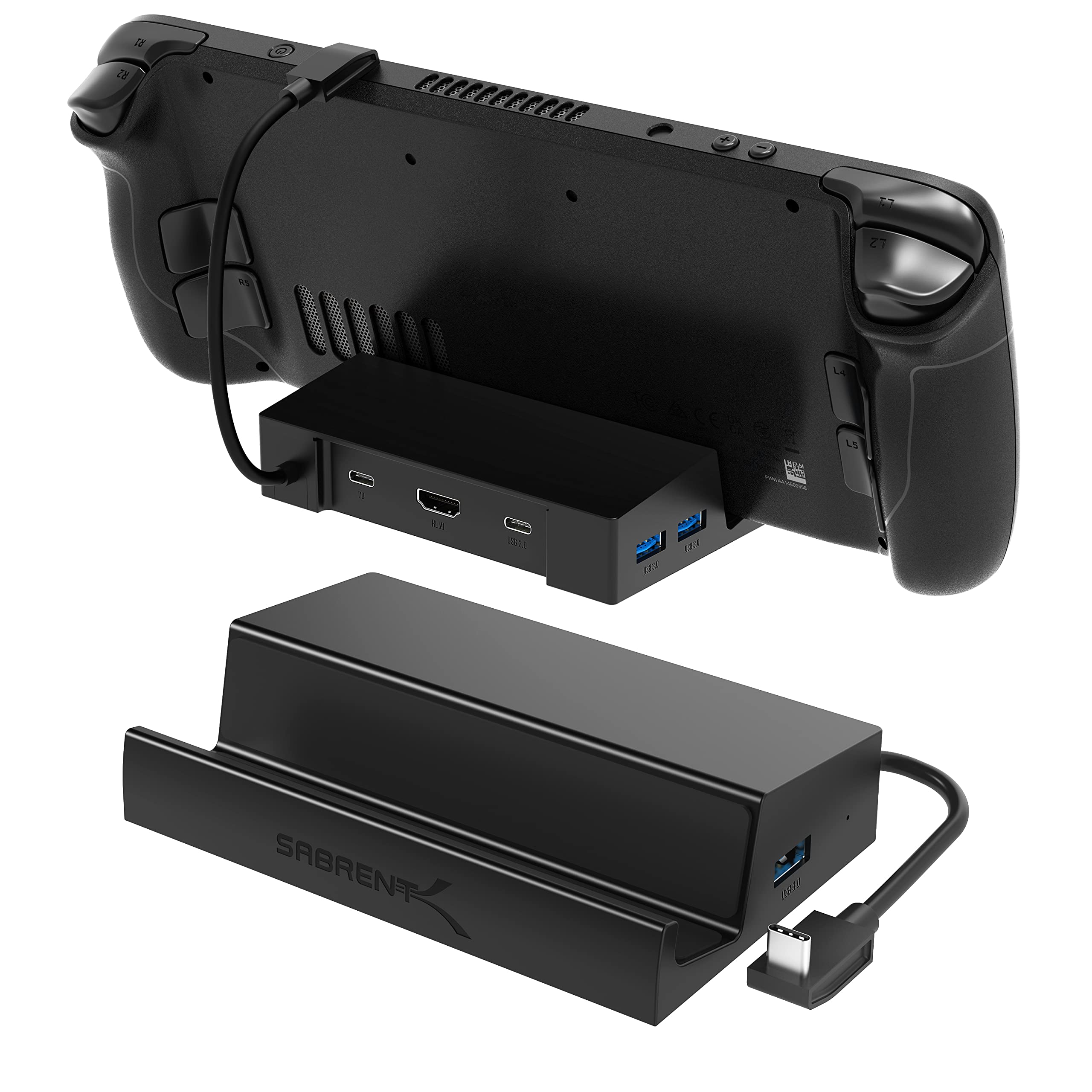
1,000+ ratings
Read Amazon ReviewsSABRENT DS-SD6P 6-Port USB-C Dock
Choose the DS-SD6P if your compatible USB-C device and portable setup matter more than wired Ethernet, audio jacks, or an HDMI-and-DVI combination. The DS-RICA is the closer fit when those latter connections are central to your desk.
- The DS-SD6P is a compact USB-C dock for compatible devices with DisplayPort Alt Mode.
- It offers HDMI 2.0 output up to 4K at 60Hz, three USB-A 5Gbps ports, an additional USB-C data port, and up to 95W of PD3.0 charging through its USB-C input.
- It does not include Ethernet or M.2 SSD support.
- The DS-RICA combines HDMI and DVI display connections with gigabit Ethernet, speaker and microphone jacks, USB-A ports, and two 2.4A charging ports.
Laptop Docking Stations alternative
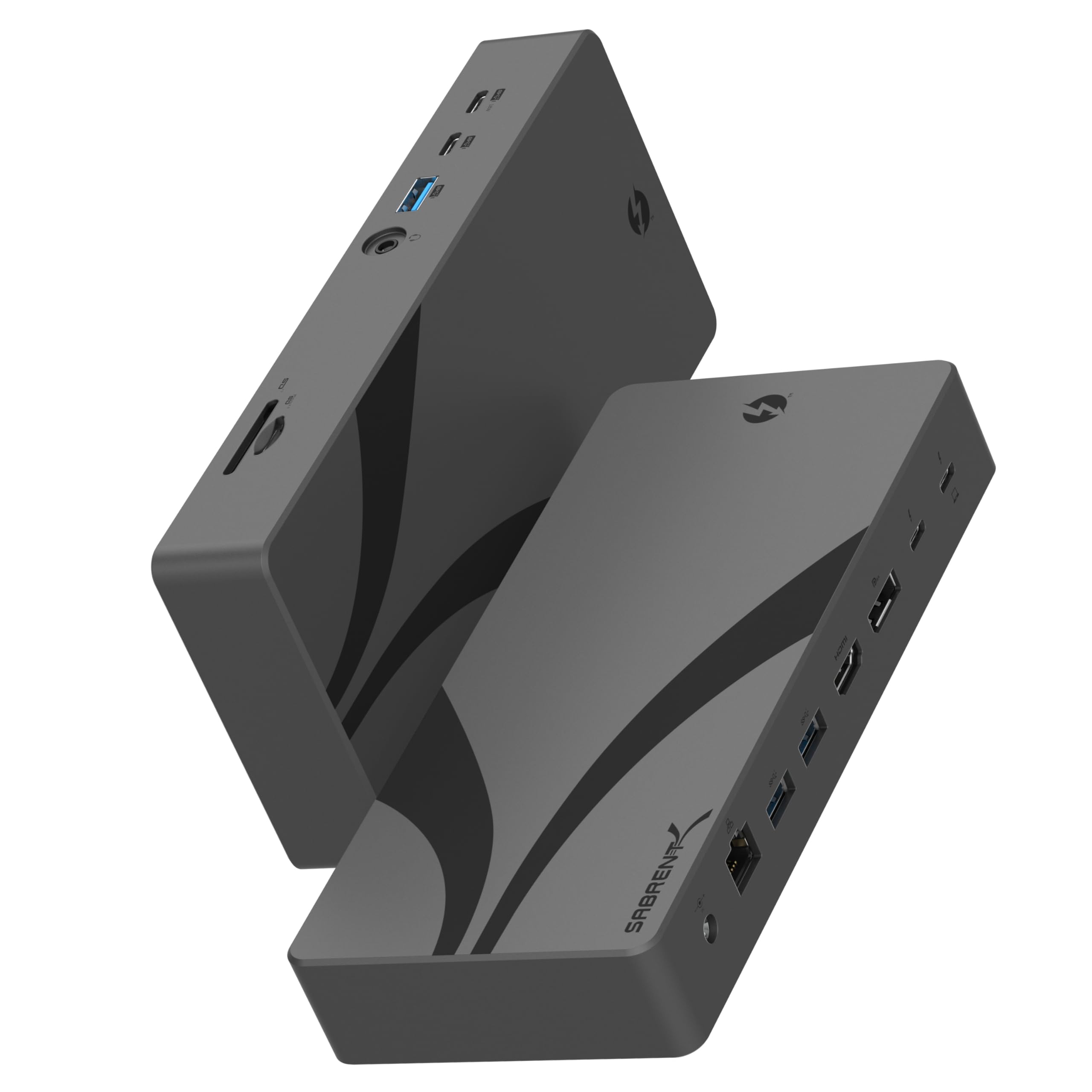
60+ ratings
Read Amazon ReviewsSABRENT DS-T4MF Thunderbolt 4 Docking Station
Consider the DS-T4MF if your computer supports its Thunderbolt or USB4 connections and you need its broader display and media-card options. The DS-RICA better matches a buyer specifically seeking its HDMI-and-DVI layout and mix of USB generations.
- The DS-T4MF is a Thunderbolt 4 dock with USB4 and Thunderbolt 3 compatibility, HDMI 2.1, DisplayPort 1.4, additional Thunderbolt 4 outputs, and gigabit Ethernet.
- It also lists USB-C and USB-A ports, SD and microSD support, audio in/out, and display modes up to 8K or dual 4K at 60Hz under specified conditions.
- The DS-RICA focuses on simultaneous HDMI and DVI, gigabit Ethernet, audio jacks, and four USB ports, with a specific DisplayLink warning for macOS 10.13.4.
Is SABRENT DS-RICA Worth It?
The SABRENT DS-RICA is worth considering for a desk that can use its simultaneous HDMI and DVI connections, gigabit Ethernet, audio jacks, mixed USB ports, and two charging ports.
Its appeal is the range of connection types gathered in one dock.
Before buying, confirm that the computer and monitors fit its display setup, count the USB connections you need, and check current driver compatibility—particularly on Mac.
If those checks line up, the DS-RICA offers a practical set of connections for a multi-device workspace.
Your review at a glance
1,000+ ratings
Read Amazon ReviewsSABRENT DS-RICA USB 3.0 Universal Docking Station
A fit for laptop and tablet users who want dual-display connections, wired gigabit Ethernet, and a mix of USB ports in one dock.
- Supports simultaneous HDMI and DVI displays.
- Includes two USB 3.0 ports with transfer speeds up to 5Gbps and two USB 2.0 ports up to 480Mbps.
- Lists USB 1.1 transfer speeds up to 12Mbps.
- Provides a 10/100/1000 gigabit Ethernet port.