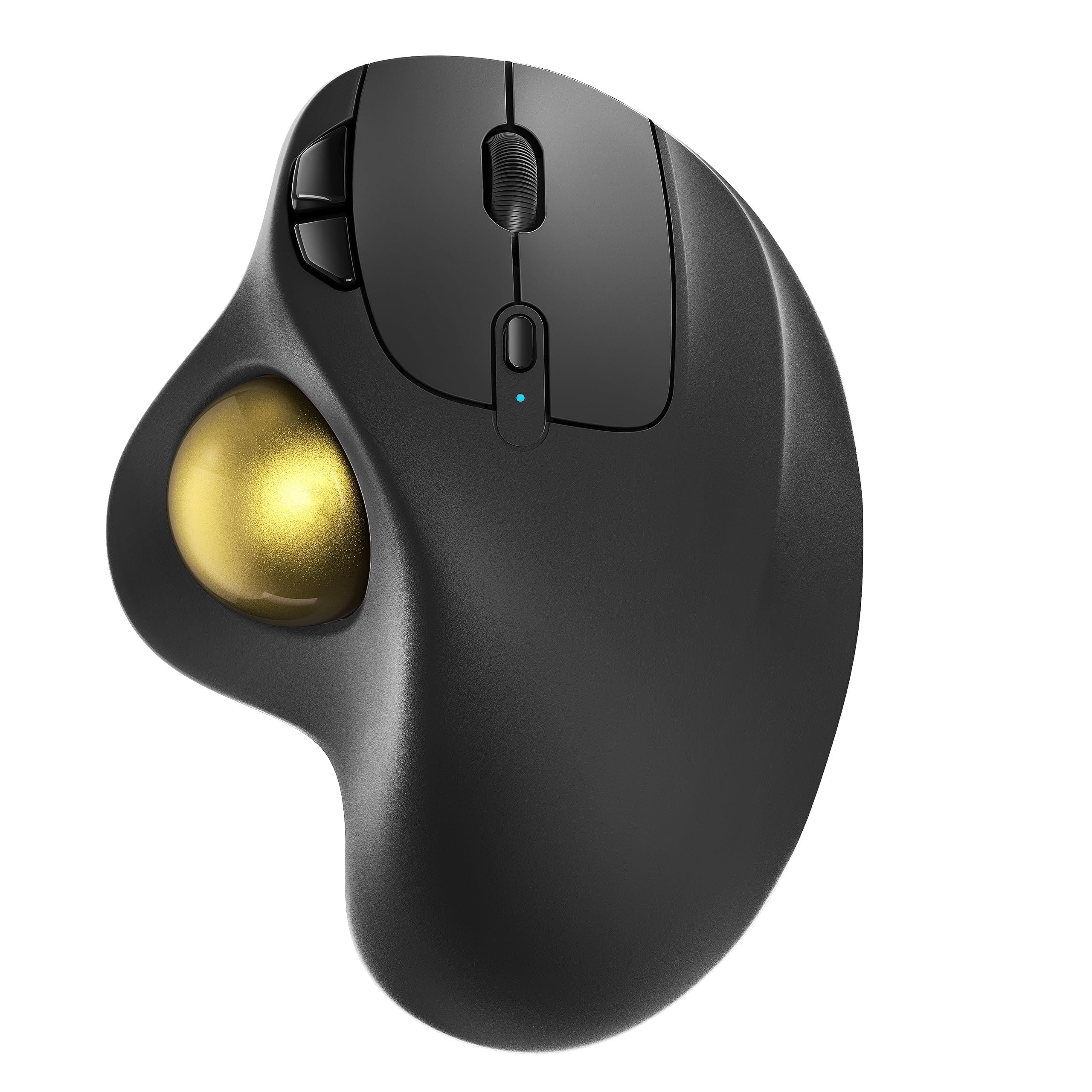
The Nulea M501 Wireless Trackball Mouse is designed for right-handed users who want to guide the cursor with a thumb-controlled ball instead of moving a conventional mouse across the desk.
This nulea m501 wireless trackball mouse review looks at its ergonomic shape, three-device connectivity, adjustable sensitivity, and the tradeoffs to consider before switching to a trackball.
Nulea M501 Review Summary
The quick verdict
12,000+ ratings
Read Amazon ReviewsNulea M501 Wireless Trackball Mouse
A right-handed wireless trackball for people who want thumb-controlled cursor movement, multi-device switching, and less desk space devoted to mouse travel.
- Stationary trackball control moves the cursor through thumb movement, without needing to slide the mouse across the surface.
- An angled ergonomic shape is designed to support a natural palm position, with a right-handed layout.
- Four DPI levels let you adjust cursor sensitivity.
- Connect by Bluetooth or the included 2.4 GHz USB receiver, and switch among up to three devices using the button on the underside.

Pros
- Trackball control can suit cramped desks and other places where moving a mouse is awkward.
- Bluetooth and USB receiver connectivity provide flexibility across compatible setups.
Consider before buying
- The right-handed thumb-operated layout is a poor fit for left-handed users and may take adjustment for people accustomed to a standard mouse.
- Buttons are not programmable, limiting customization for users who want task-specific shortcuts.
Read the full review summary
The M501’s central appeal is its stationary design: the trackball moves the cursor while the mouse stays put.
That can be useful when desk space is tight or when you work from a couch, bed, or small writing surface.
Its angled, curved shape is intended to let the palm rest in a natural position, while adjustable DPI offers a way to tune cursor movement to the task.
Bluetooth and a USB receiver provide ways to connect, and the mouse can switch among up to three devices using a button underneath. A built-in rechargeable battery avoids disposable cells, and six buttons include back and forward controls.
The right-handed layout, thumb-driven movement, and nonprogrammable buttons make it a more specific fit than a conventional ambidextrous mouse.
The buying factors
Nulea M501 Scorecard
Editorial scores reflect listed features and buyer fit; they are not laboratory measurements or customer ratings.
Space-conscious control
Cursor movement comes from the trackball, so the mouse does not need a clear surface for repeated travel.
Ergonomic design
Its angled form and thumb control are designed to keep the palm in a natural position, though comfort will depend on hand fit and preference.
Connection flexibility
Bluetooth and a USB receiver support connection options, with switching among up to three devices.
Cursor adjustment
Four DPI levels give users a choice of cursor sensitivity for different work styles.
Button versatility
Six buttons and back and forward controls cover useful navigation, while the buttons cannot be programmed.
Power convenience
The built-in rechargeable battery removes disposable-cell changes, but charging requires attention to the recommended power source.
Key Features and Specifications of Nulea M501
- Stationary trackball control moves the cursor through thumb movement, without needing to slide the mouse across the surface.
- An angled ergonomic shape is designed to support a natural palm position, with a right-handed layout.
- Four DPI levels let you adjust cursor sensitivity.
- Connect by Bluetooth or the included 2.4 GHz USB receiver, and switch among up to three devices using the button on the underside.
- Six buttons include back and forward controls; the buttons are not programmable.
- A built-in rechargeable battery is charged with the included cable. The guidance specifies using a computer USB port or a 5V charger and avoiding fast chargers.
Pros and Cons of Nulea M501
Pros
- Trackball control can suit cramped desks and other places where moving a mouse is awkward.
- Bluetooth and USB receiver connectivity provide flexibility across compatible setups.
- Switching among up to three devices can make a shared desk setup easier to manage.
- Four DPI levels and dedicated back and forward buttons give useful everyday control options.
Consider before buying
- The right-handed thumb-operated layout is a poor fit for left-handed users and may take adjustment for people accustomed to a standard mouse.
- Buttons are not programmable, limiting customization for users who want task-specific shortcuts.
- Charging instructions rule out fast chargers; plan to use a computer USB port or a 5V charger.
Who Should Buy Nulea M501?
Good fit
Consider the M501 if you regularly work in a compact space, use a couch or bed as a work surface, or want cursor control without sweeping a mouse across the desk.
A stationary trackball may help keep the pointing device in reach even when there is little room for a mouse pad or broad arm movement.
It is also a practical candidate if you move between several devices. Bluetooth and the included receiver support different connection setups, and the underside switch handles transitions among up to three paired devices.
Check that your devices match the stated Windows or Mac OS compatibility and that you are comfortable reaching underneath to switch.
The curved, angled body and thumb control are aimed at a more natural resting posture, but comfort is personal. If possible, try a similar thumb trackball shape or confirm the return terms before committing to a full-time change.
Who should skip it
Skip this design if you need a left-handed mouse, prefer cursor control by moving the whole device, or rely on programmable buttons for macros and custom shortcuts.
If you want to use a fast charger or need a particular OS version beyond Windows 10 or Mac OS, check compatibility and charging requirements before buying.
How the Nulea M501 Fits a Compact Workspace
Thumb control changes how you point
A trackball keeps the body stationary while the thumb rotates the ball to move the cursor. That shifts the repeated motion from moving the entire mouse to operating the ball with one digit.
People who like that style may find it convenient on narrow surfaces, though the transition can feel unfamiliar if their muscle memory depends on sweeping a mouse.
The shape is designed around a resting hand
The M501’s angled profile and curved shape are intended to let the palm sit naturally.
This is a design goal rather than a guarantee of comfort: hand size, grip, and the amount of thumb movement each person prefers all affect fit.
Right-handed users who want a more stationary pointing device are the clearest audience.
Multi-device setup has a physical switch
Bluetooth and the 2.4 GHz receiver give the M501 two connection methods, while the underside button changes among as many as three devices. That can simplify a setup with multiple computers, but switching involves reaching below the mouse.
The receiver is stored in a compartment on the underside when not in use.
DPI and buttons favor straightforward control
Four DPI levels let users select among cursor sensitivity settings, which can help tailor movement to their screen and habits.
Six buttons add back and forward navigation, but none can be programmed, so users who want custom commands should account for that limit.
Alternatives to Nulea M501
No alternative model is recommended here. Compare the design and features that matter to your routine before choosing another option.
Is Nulea M501 Worth It?
The Nulea M501 Wireless Trackball Mouse is worth considering if you are right-handed, have limited room for mouse movement, and are willing to learn thumb-controlled cursor operation.
Its adjustable DPI, dual connection options, multi-device switching, and rechargeable battery make it a capable set of everyday conveniences.
Buy it for the stationary trackball format and compact-space flexibility, with realistic expectations about the learning curve and personal comfort. Look elsewhere if you need left-handed use, programmable buttons, or charging beyond the recommended USB or 5V options.
Your review at a glance
12,000+ ratings
Read Amazon ReviewsNulea M501 Wireless Trackball Mouse
A right-handed wireless trackball for people who want thumb-controlled cursor movement, multi-device switching, and less desk space devoted to mouse travel.
- Stationary trackball control moves the cursor through thumb movement, without needing to slide the mouse across the surface.
- An angled ergonomic shape is designed to support a natural palm position, with a right-handed layout.
- Four DPI levels let you adjust cursor sensitivity.
- Connect by Bluetooth or the included 2.4 GHz USB receiver, and switch among up to three devices using the button on the underside.