A thoughtful gaming gift can make a familiar setup more comfortable, support a favorite way to play, or bring friends and family into the fun.
These eight ideas span desk gear, audio, controls, and a big-screen option. Check compatibility and available space before choosing.
8 Gift Ideas for Gamers, from Desk Upgrades to Big-Screen Play
HUANUO FlowLift Dual Monitor Stand

- Fits two computer screens measuring 13 to 32 inches, with each arm holding 4.4 to 19.8 lbs; VESA mounting holes must be 75x75mm or 100x100mm.
- Offers grommet mounting as an installation option.
- Routes cords along the arms and lifts screens off the desk.
Best Gift For: A PC gamer with two compatible monitors and a suitable wooden desk.

TP-Link Archer AXE75 WiFi 6E Router

- Tri-band WiFi 6E includes a 6 GHz band.
- OFDMA and tri-band technology support simultaneous transmission to more devices.
- Includes VPN server and client support.
Best Gift For: A gamer upgrading a home network used for gaming, streaming, and other connected devices.
SteelSeries Arctis Nova Pro Wireless Headset

- Connects two systems at once and lets the user switch between them.
- Offers active noise cancellation and a Transparency Mode.
- Two hot-swappable batteries keep a spare charging in the base station.
Best Gift For: A gamer who plays across compatible systems and values focused listening.
FIFINE T669 USB Microphone Kit

- USB connection supports plug-and-play setup with a PC or laptop; it is incompatible with Xbox.
- The cardioid capsule captures audio from the front and helps avoid ambient noise.
- The kit includes a boom arm stand and double pop filter.
Best Gift For: A PC gamer who streams, records voiceovers, or chats online.
SteelSeries Apex Pro Wired Gaming Keyboard

- Offers 40 levels of per-key actuation from 0.1 to 4.0 mm.
- Lets a key perform two actions at different press depths.
- The OLED display shows information from games and apps.
Best Gift For: A PC gamer who wants to customize key response and access media controls at the desk.
Audioengine A2+ Wireless Computer Speakers

- Compact powered speakers are engineered for nearfield listening on desks.
- Bluetooth streaming and wired inputs support connections to several devices.
- Hand-finished real wood cabinets and custom-tuned drivers are part of the design.
Best Gift For: A gamer who also listens to music, watches movies, or takes calls at a desk.
SteelSeries Aerox 3 Wireless Gaming Mouse

- The holey shell reduces weight to 68 g.
- Supports 2.4GHz wireless for gaming and Bluetooth 5.0.
- Three-zone PrismSync RGB has configurable colors.
Best Gift For: A PC gamer who prefers a wireless mouse and configurable lighting.
Valerion VisionMaster Pro2 Triple Laser Projector
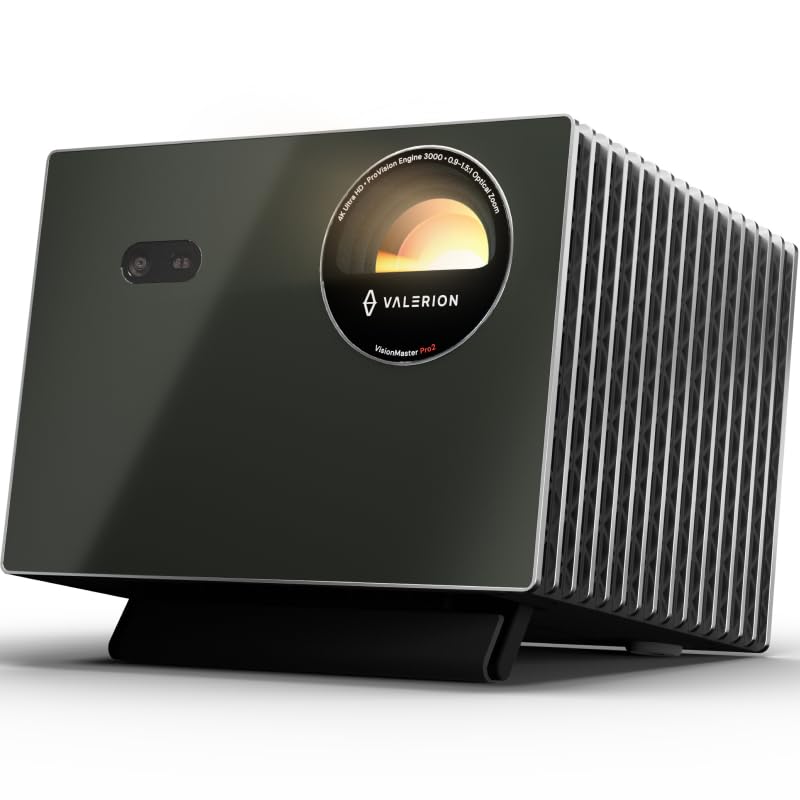
- Supports 4K UHD clarity and HDR10+.
- Offers 4 ms input lag and a 240 Hz refresh rate on ultra-wide 21:9 or 32:9 screens.
- Includes Google TV and supports AirPlay 2, Miracast, and Chromecast.
Best Gift For: A gamer planning a larger shared-viewing setup with compatible space and equipment.
Choosing gifts for gamers by setup and play style
Start with how the recipient plays. Someone at a fixed PC desk may appreciate gear that changes the feel of that space, while a player who moves between consoles and a computer may get more use from flexible audio or network equipment.
Think about their daily routine before choosing.
Notice practical clues: multiple displays, a crowded desktop, frequent voice chat, or friends gathering to watch. A useful gift addresses something they already do.
For an upgrade that connects to existing equipment, quietly check their system and setup details first; compatibility can matter more than a feature list.
For gifts for gamers, match the scale of the gift to the room and the player’s habits. A desk accessory suits a dedicated workspace, while a projector is a more involved choice that calls for room to set up and share a large image.
If uncertain, favor an upgrade that fits into their current routine.
Balancing a gaming gift budget
Gaming gear ranges from modest desktop additions to major entertainment purchases. Decide what feels comfortable before browsing, then compare the kind of improvement each gift offers.
A microphone may serve regular calls and streams; speakers could also support music and films. The broader the everyday use, the easier it can be to make a gift feel considered.
A higher spend can make sense when you know the recipient wants a particular upgrade and their devices support it. For less certainty, choose a simpler accessory or consider pairing a small item with a handwritten note.
Check actual prices at purchase time, since prices can change, and compare what is included before deciding.
Keep the total in view, including any equipment the recipient may need for a complete setup. A monitor stand depends on desk and screen compatibility, while a larger display plan can require more planning around room layout.
Avoid assuming that a gift will be ready to use without checking the recipient’s existing gear.
Personal touches for gifts for gamers
For gifts for gamers, presentation can reflect the way someone enjoys playing. Add a note referencing a favorite multiplayer night, a long-running campaign, or the friend group they chat with.
The detail makes even a practical accessory feel chosen for that person rather than selected from a generic list.
You can tailor the wrapping to their setup without revealing more than you intend: use colors that suit their desk, tuck in a small snack for a game night, or include a card offering to help arrange the new gear. Keep the gesture easy to accept; some players prefer setting up devices on their own.
If you are gifting something that connects to a console or computer, include a short note naming the intended use and encourage them to check compatibility before opening or installing it. For a shared-room item, frame it as an invitation to spend time together.
Personal context can carry the gift even when technical preferences are hard to guess.
A practical final check before buying
Before ordering, verify the exact model and whether it works with the recipient’s console, computer, display, desk, or network. Gaming accessories can have specific connection and mounting needs.
Compare current product details with the equipment they use, and ask someone close to them if a quiet compatibility check would preserve the surprise.
For gifts for gamers ordered close to a celebration, review the seller’s current delivery estimate and return terms before checkout. Do not rely on a remembered shipping window.
If timing feels uncertain, choose a thoughtful card that explains the planned gift, or buy from a local shop after checking availability directly.
Think through the whole unboxing: does the gift need space, setup, or another device? Confirm dimensions against the intended spot and check what comes in the package.
A small amount of planning helps avoid an awkward surprise and gives the recipient a clear, enjoyable next step when they open it.
Make the gift easy to enjoy
If you can, keep packaging and receipts organized so the recipient can check fit and preferences without hassle. For an item that needs configuration, offer to help only if they want it; some people enjoy tuning a new setup themselves.
The gift should leave room for their habits, favorite games, and personal settings.
A shared activity can make a practical upgrade memorable. Suggest a relaxed evening to try the new audio or play together, while letting the recipient decide when to set things up.
Avoid planning around a specific game or platform unless you know they use it; a flexible invitation is more welcoming.
The strongest choice is one that fits the person’s actual space, devices, and play style. Consider whether they value a tidy desk, communication, immersive audio, or a group viewing experience, then choose accordingly.
A clear note and a little attention to setup details help turn a gaming purchase into a thoughtful gift.